
Beta Testing

SplitDue.

Split Bills, Settle Up Fast

Product information updated October 28, 2026

SplitDue is an INDR app for iPhone and iPad that keeps shared money simple. Add what someone paid, choose how to split it, and SplitDue keeps every balance right for trips, roommates, couples and dinners. Share a group by link and everyone joins through iCloud, with no sign-up. Pay With opens Venmo, Cash App, Zelle, PayPal and more with the amount filled in; SplitDue never moves money. Version 1.0 is in TestFlight beta testing ahead of its App Store release.

iPhone iPad

Beta Testing

SplitDue is in TestFlight beta testing ahead of its App Store release. The features and screenshots below are from the beta build, and the App Store listing is ready for review. Details may change before release.

Split Any Way

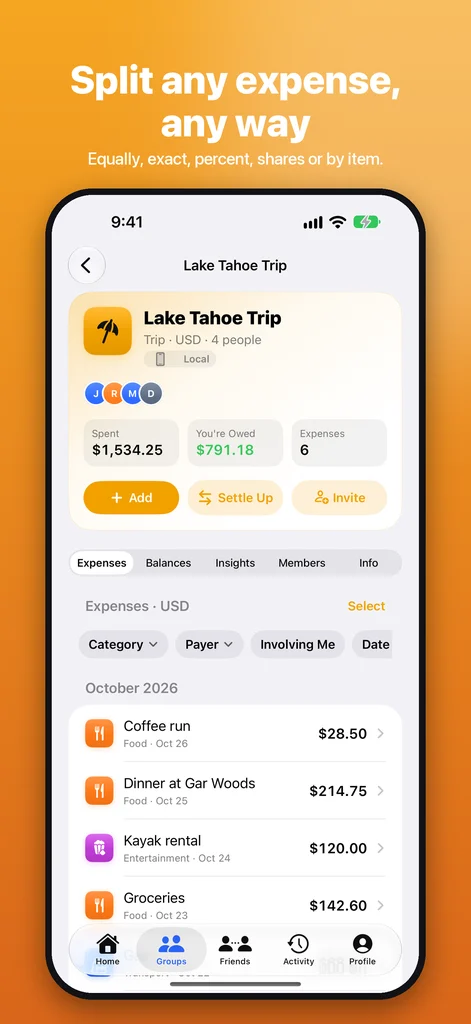
Equally, by exact amounts, percentages, shares, adjustments, or item by item.

Itemized splits handle tax, tip and discounts. Several people can pay for one expense, any currency works with live exchange rates, scanning a receipt fills in the items, and you can just say "Dinner 84 with Ben and Cy, I paid".

Settle Up in a Tap

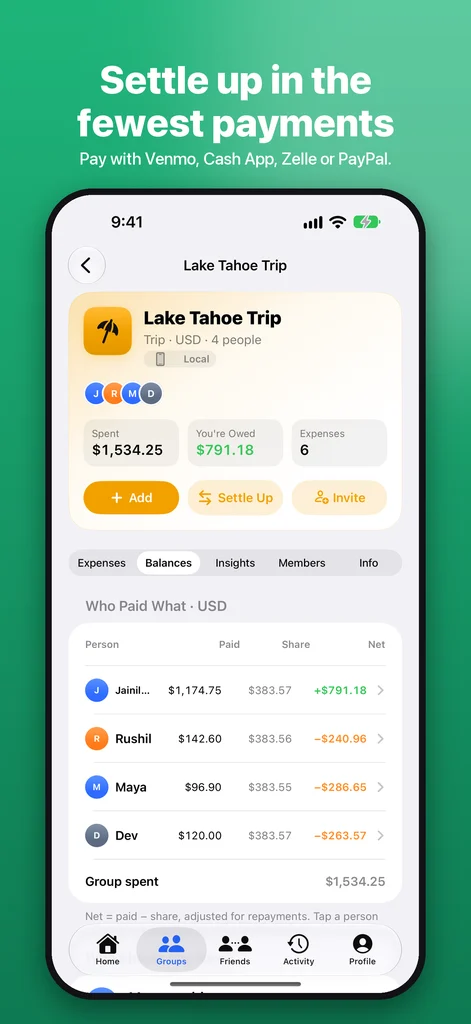
See exactly who owes whom, with the fewest repayments possible.

Pay With opens Venmo, Cash App, Zelle, PayPal, Apple Cash, UPI, Revolut or your bank with the amount filled in. You confirm there; SplitDue only records it. Partial payments, loans, installment plans, payment requests and friendly reminders are built in.

Together, Privately

Share a group by link or QR code. Everyone joins through iCloud, with no sign-up.

Owners and admins choose who can add, edit, settle and invite. Edits made at the same time are never merged silently. Your records live on your devices and in your own iCloud, never with INDR.

Profiles and a Group Feed

Tap anyone in a group to see their profile, and follow what is happening in a Venmo-style feed.

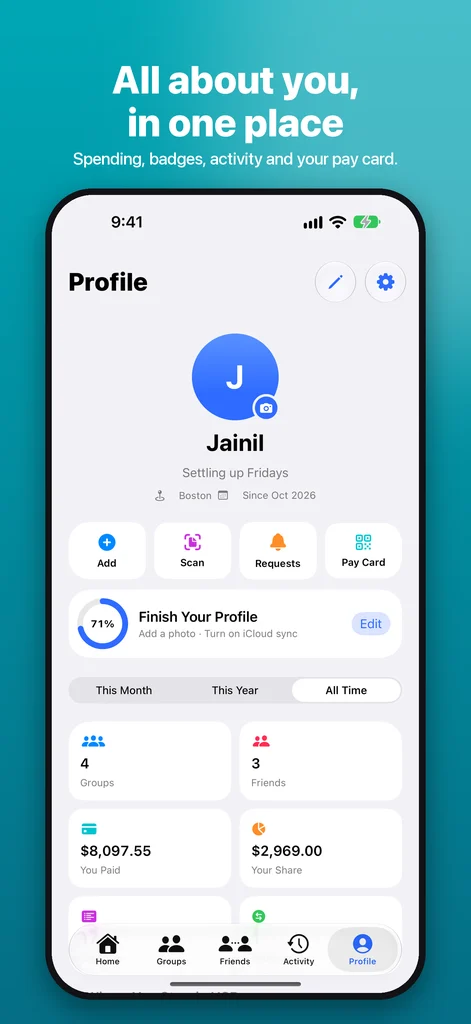
Profiles show a photo, status, bio, badges, groups in common, your balance with them and a Pay button. Profile Privacy lets each person choose My Groups or Only Me for every detail, and hide their activity or amounts from the feed. Only people you share a group with can see them.

Reactions, Comments and Genmoji

Comment on any expense, @mention people, and react with any emoji or a Genmoji.

Genmoji reactions sync as a picture, so everyone in the group sees them. People you pay can say thanks the same way.

Made for iPhone and iPad

Widgets, Live Activities, CarPlay, Siri and Shortcuts.

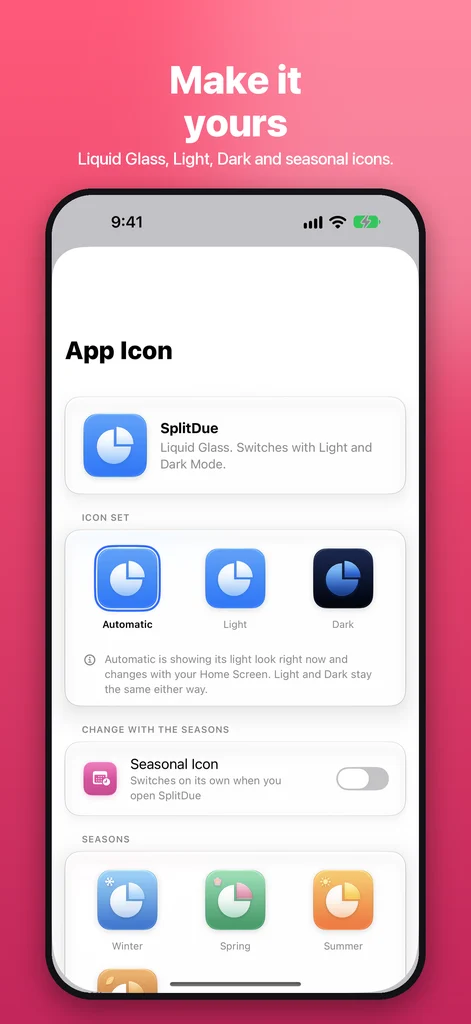
Home Screen and Lock Screen widgets, a Live Activity for trips, one-tap logging from CarPlay, SharePlay for splitting a bill on a FaceTime call, and Liquid Glass app icons in Light, Dark and seasonal styles.

Insights and Reports

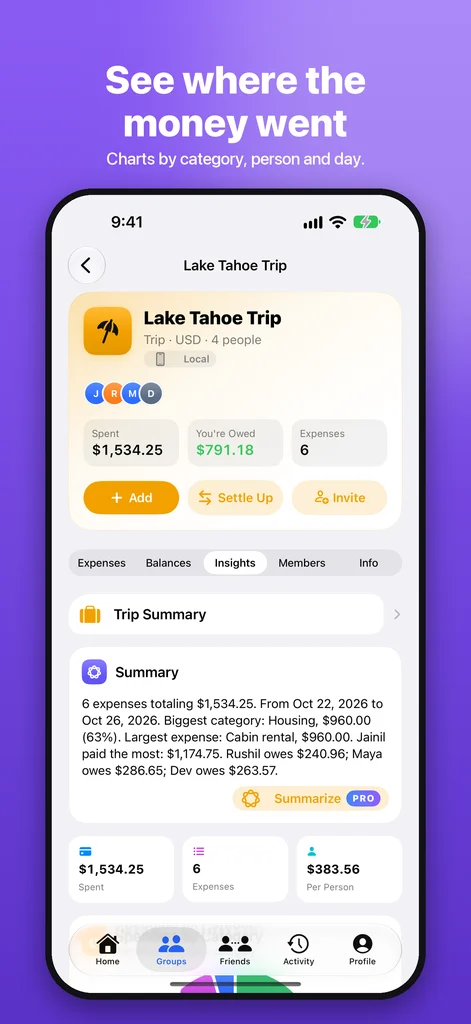
Charts by category, person and month, budgets, and trip recaps.

Year in Review and trip summaries you can share, spreadsheet export, and with SplitDue Pro: PDF statements, budgets and Apple Intelligence features like Ask Your Ledger, all on your iPhone.

Free to Split

Groups, friends, every split method, settling up and sharing are free, with no ads or limits.

SplitDue Pro is optional: monthly, yearly or a one-time lifetime purchase adds Apple Intelligence, PDF statements and reports, budgets, custom accent colors and new icon packs. Tips are optional and unlock nothing.

Private by Design

No accounts, no ads, no analytics and no tracking.

App Privacy: Data Not Collected. Records stay on your devices and in your own iCloud, App Lock can require Face ID, and email, phone and birthday are never shared.

A Closer Look

See SplitDue in Action

Screenshots of the version 1.0 beta build, prepared for the App Store listing. The final release may differ.

Not Yet Released

Next Up After 1.0: Profiles and Feed

These features are in the latest development build, after the 1.0 build that is in beta testing. They are planned for the first update and may change.

Member Profiles

An Instagram-style profile for everyone in your groups.

A ringed avatar with counts, bio and city, Pay or record buttons, badge highlights, an activity grid, groups in common and payment usernames to copy. Profiles also open for people invited but not joined yet.
Profile Privacy

Choose who sees each part of your profile.

A Public or Private switch, then My Groups or Only Me for photo, status, bio, home city, badges, stats and payment usernames, with a live preview of how others see you.

Group Feed

A Venmo-style feed of expenses, repayments and comments.

The most private choice of anyone involved wins: hidden activity leaves the feed, and hidden amounts show a lock.

Any Emoji or Genmoji

React with anything from the emoji keyboard.

Quick reactions, recents, any emoji, and Genmoji that sync as a picture for everyone.

App Store Listing

SplitDue Listing

Listing Information

Subtitle
Split bills, settle up fast
Promotional Text
Split any bill in seconds, see exactly who owes whom, and settle up with Venmo, Cash App, Zelle or PayPal in a tap. No ads, no limits, no sign-up.
Description

SplitDue makes shared money simple. Add what someone paid, choose how to split it, and SplitDue keeps every balance right, so trips, roommates and dinners never end in awkward math.

SPLIT ANY WAY

  • Equally, by exact amounts, percentages, shares, adjustments, or item by item with tax and tip
  • Scan a receipt and the items fill in for you
  • Say "Dinner 84 with Ben and Cy, I paid" and it's added
  • Several people can pay for one expense
  • Any currency, with live exchange rates and one combined total

SETTLE UP IN A TAP

  • See exactly who owes whom, with the fewest repayments possible
  • Pay With opens Venmo, Cash App, Zelle, PayPal, Apple Cash, UPI, Revolut or your bank with the amount filled in. You confirm there; SplitDue never moves money
  • Partial payments, loans, installment plans and friendly reminders
  • Payment requests your friends can answer straight from the notification

TOGETHER, PRIVATELY • Share a group by link or QR code. Everyone joins through iCloud, with no sign-up • Roles and rules for who can add, edit or settle • Comments, @mentions and reactions on any expense • Split a bill together over SharePlay on a FaceTime call • Your records live on your devices and in your own iCloud. No ads, no tracking, no accounts

MADE FOR iPHONE • Widgets for your Home Screen and Lock Screen, a Live Activity for trips, and CarPlay • Siri and Shortcuts: "Add to SplitDue…" • Liquid Glass design with Light, Dark and seasonal app icons • Customize your tabs, Home cards, accent color and group icons

FREE TO SPLIT

Groups, friends, every split method, settling up, sharing, reminders, backups and exports are free, with no ads and no limits.

SPLITDUE PRO (OPTIONAL)

  • SplitDue Pro Monthly and Yearly are auto-renewing subscriptions. SplitDue Pro Lifetime is a one-time purchase.
  • Payment is charged to your Apple Account at confirmation of purchase. Subscriptions renew automatically unless canceled at least 24 hours before the end of the current period, and your account is charged for renewal within 24 hours before the period ends.
  • Manage or cancel any time in Settings → your name → Subscriptions.

Add Apple Intelligence (Ask Your Ledger, AI summaries and trip recaps, all on your iPhone), PDF statements and reports, budgets, custom accent colors and new icon packs.

Terms of Use: https://indr.app/splitdue/terms/ Privacy Policy: https://indr.app/splitdue/privacy/ Questions: support@indr.app

Keywords
split,bill,expense,roommate,trip,group,share,cost,owe,iou,receipt,travel,friends,rent,dinner,settle
What’s New
Welcome to SplitDue! Split expenses with anyone, settle up with the payment apps you already use, and keep everything private in your own iCloud.

Pricing and Availability

App Price
Free
Free Tier
Splitting, settling up, sharing, reminders, backups and exports are free with no ads or limits. SplitDue Pro is optional.
Countries or Regions
175 App Store Territories
Languages
English

Subscriptions2

  • SplitDue Pro Monthly $1.99 Auto-renewing monthly subscription. Apple Intelligence, reports, budgets, colors and new icons.
  • SplitDue Pro Yearly $11.99 Auto-renewing yearly subscription. Every Pro feature, best value.

One-Time Purchases1

  • SplitDue Pro Lifetime $24.99 One-time purchase. Every Pro feature, yours forever.

Tips6

Optional tip; unlocks nothing

  • Coffee $0.99
  • Snack $2.99
  • Lunch $4.99
  • Dinner $9.99
  • Pizza Party $19.99
  • Hero $49.99

Current Promotions

N/A

App Information

Primary Category
Finance
Secondary Category
Travel
Age Rating
4+
Version
1.0
Build
4 (TestFlight beta)
Release Date
Not released yet. In TestFlight beta testing
Last Updated
October 28, 2026
Download Size
Varies With Device
Compatibility
Requires iOS 27 or iPadOS 27 or later.
Bundle ID
com.indr.splitdue
SKU
splitdue-ios
Copyright
© 2026 Jainil Patel
Developer
INDR

Ratings and Reviews

Average Rating
N/A
Rating Count
N/A

App Store Screenshot Sets

iPhone · 6.9-inch (1320 × 2868)

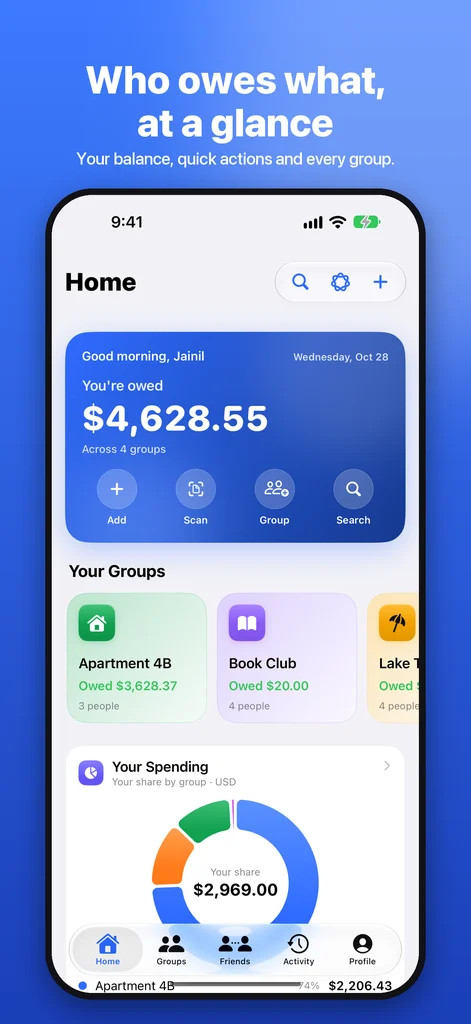
  • Who owes what, at a glance
  • Split any expense, any way
  • Settle up in the fewest payments
  • See where the money went
  • All about you, in one place
  • Make it yours

iPad · 13-inch (2064 × 2752)

  • Who owes what, at a glance
  • Split any expense, any way
  • Settle up in the fewest payments
  • See where the money went
  • All about you, in one place
  • Make it yours

Release Timeline

  1. 1.0 October 2026 Beta Testing
    • Builds 3 and 4 are on TestFlight for testers.
    • App Store listing, screenshots, subscriptions and tips are set up in App Store Connect.
    • Goes to App Review next; this page will link to the App Store once it is live.

Review URLs

Support URL
https://indr.app/splitdue/support/
Marketing URL
https://indr.app/splitdue/
Privacy Policy URL
https://indr.app/splitdue/privacy/

Accessibility

  • VoiceOver labels on balances, charts, reactions and every action.
  • Dynamic Type and Bold Text supported.
  • Reduce Motion respected for celebrations and transitions.
  • Keyboard and pointer support on iPad.

Privacy

  • App Privacy: Data Not Collected. No ads, analytics or tracking.
  • Records stay on your devices and, if you turn it on, in your own private iCloud.
  • Shared groups are shared through iCloud only with the people who join.
  • Profiles show only what Profile Privacy allows, and only to people in your groups.
  • Purchases are handled by Apple; INDR never sees payment details.
Technical Specifications

SplitDue Details

Version 1.0 (TestFlight beta)
Release Stage Beta testing on TestFlight; App Store release after review
Compatibility iOS 27 and iPadOS 27 or later; CarPlay
Price Free; optional SplitDue Pro and tips
SplitDue Pro $1.99 per month, $11.99 per year, or $24.99 one time
Sharing iCloud group sharing; no SplitDue account
Data Handling On device and in your own iCloud; Data Not Collected
Payments Opens Venmo, Cash App, Zelle, PayPal, Apple Cash, UPI and more; never moves money

Release History

  • 1.0 (beta) · October 2026

    • Split equally, exactly, by percent, shares, adjustments or item by item, with multiple payers and any currency.
    • Settle up with the fewest repayments; Pay With for Venmo, Cash App, Zelle, PayPal, Apple Cash, UPI and more.
    • Shared groups through iCloud with roles, comments, @mentions and reactions.
    • Widgets, Live Activities, CarPlay, Siri, Shortcuts and SharePlay.
    • Liquid Glass app icons with Light, Dark and seasonal styles.
    • Optional SplitDue Pro and tip jar.
FAQ

SplitDue Questions

Does SplitDue Move Money?

No. SplitDue keeps the records and the math. Pay With opens Venmo, Cash App, Zelle, PayPal, Apple Cash, UPI or your bank with the amount filled in, and you confirm the payment there.

Do My Friends Need an Account?

No. There is no SplitDue account. Share a group by link or QR code, and people join through iCloud and pick which member they are.

Is SplitDue Free?

Yes. Groups, friends, every split method, settling up, sharing, reminders, backups and exports are free, with no ads and no limits. SplitDue Pro is optional.

What Does SplitDue Pro Include?

Apple Intelligence features (Ask Your Ledger, summaries and trip recaps, on your iPhone), PDF statements and reports, budgets, custom accent colors and new icon packs. Choose $1.99 a month, $11.99 a year, or $24.99 once.

Who Can See My Profile?

Only people in groups you share. Profile Privacy lets you choose My Groups or Only Me for each detail, make your whole profile private, and hide your activity or amounts from the feed. There is no public directory.

When Is SplitDue Coming to the App Store?

Version 1.0 is in TestFlight beta testing now. It goes to the App Store after Apple's review; this page will link to it as soon as it is live.

Is SplitDue Available on Android?

No. SplitDue is built for iPhone, iPad and CarPlay.